
Suppliers
Everyone you buy stock from, and what you still owe each of them.
Overview
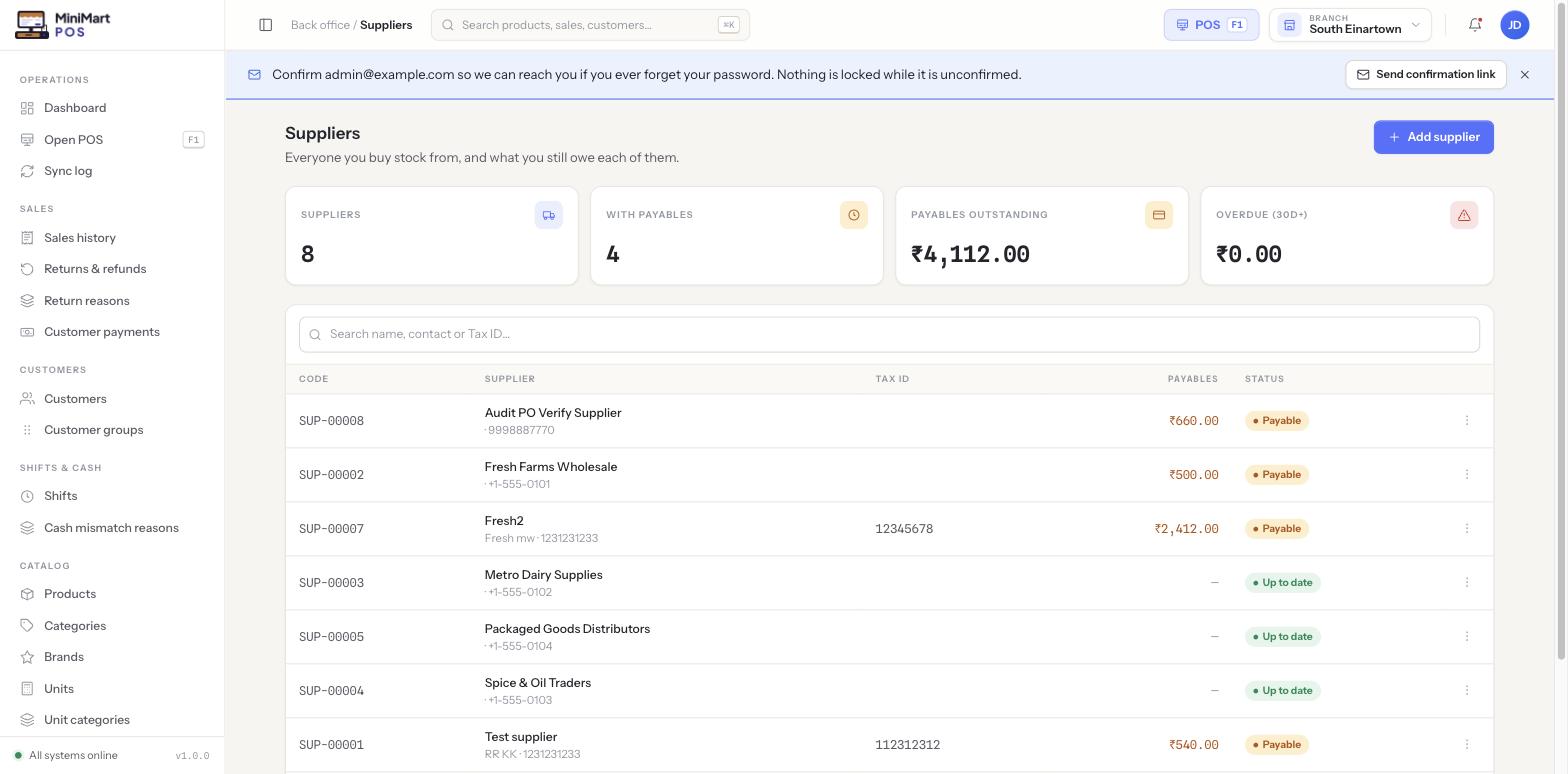
The Suppliers list is your directory of every vendor you buy stock from, each with its own contact details, Tax ID, and — most usefully — a running payables balance showing exactly how much you currently owe them. A supplier is store-wide, like the product catalog: the same supplier list is shared across every branch, since you typically buy from the same vendors regardless of which branch the stock lands in.
Why it's useful
Instead of chasing down what you owe each vendor from a stack of separate bills, the Suppliers list gives you one place where every bill and payment for that supplier is already totalled into a single, current balance. The "Overdue 30d+" stat flags suppliers you're genuinely behind on, before a relationship or your credit terms with them are put at risk.
Step by step
Add a supplier
- Click Add supplier
Enter their name, phone number, and Tax ID if they have one (used on purchase documents and for your own tax reporting).
- Save
MiniMart assigns a supplier code (e.g. SUP-00008) automatically — you don't need to invent one yourself.
Read a supplier's ledger
- Open a supplier from the list
You'll see every bill and payment recorded against them, in order, alongside their current payable balance.
- Use it to resolve disputes
If a supplier's own statement disagrees with your balance, this ledger is where you trace exactly which bill or payment accounts for the difference.
Understand the status pill
A supplier shows Payable when they have any outstanding balance, and Up to date once every bill against them has been paid in full.
The Suppliers list columns
| Column | What it shows |
|---|---|
| Code | An auto-assigned reference like SUP-00008 — stable, so it won't change if you rename the supplier. |
| Supplier | Name, with phone number or Tax ID shown underneath for quick identification. |
| Tax ID | Their own registered tax identifier, if recorded. |
| Payables | What you currently owe this supplier, summed across every unpaid or partially paid bill. |
| Status | Payable or Up to date, derived directly from the payables figure. |
Tips & best practices
- Record a Tax ID for every supplier you can — it's needed on purchase documentation and saves you chasing it down later at tax time.
- Use the search box to find a supplier quickly rather than scrolling, especially once your vendor list grows past a page.
- Check the Suppliers list before placing a large new order with a vendor you already owe a significant payable to.
Notes & warnings
A supplier you add is available from every branch of your store — you don't need to re-add the same vendor per branch. Only the purchase orders and bills raised against them are specific to a branch.