
Packages, plans & gateways
What a store gets for what it pays — limits, unlocked modules and price — plus the platform's own payment gateways and offline methods for collecting that subscription money.
Overview
This cluster defines the product you're actually selling to stores: the subscription plans (packages) themselves, and the two ways a store can pay for one — a real payment gateway, or an offline method you arrange outside any gateway. It's billing setup, as opposed to Stores, subscriptions & invoices, which is where you see which store is on which plan and whether they're paid up.
Why it's useful
Plans are how you turn "one piece of software" into an actual subscription business: a small shop on a cheaper plan with one branch and no Purchasing module, a growing chain on a higher plan with unlimited staff and every module unlocked. Changing a plan's price or limits here takes effect for every store that plan applies to, without touching code.
Packages & plans
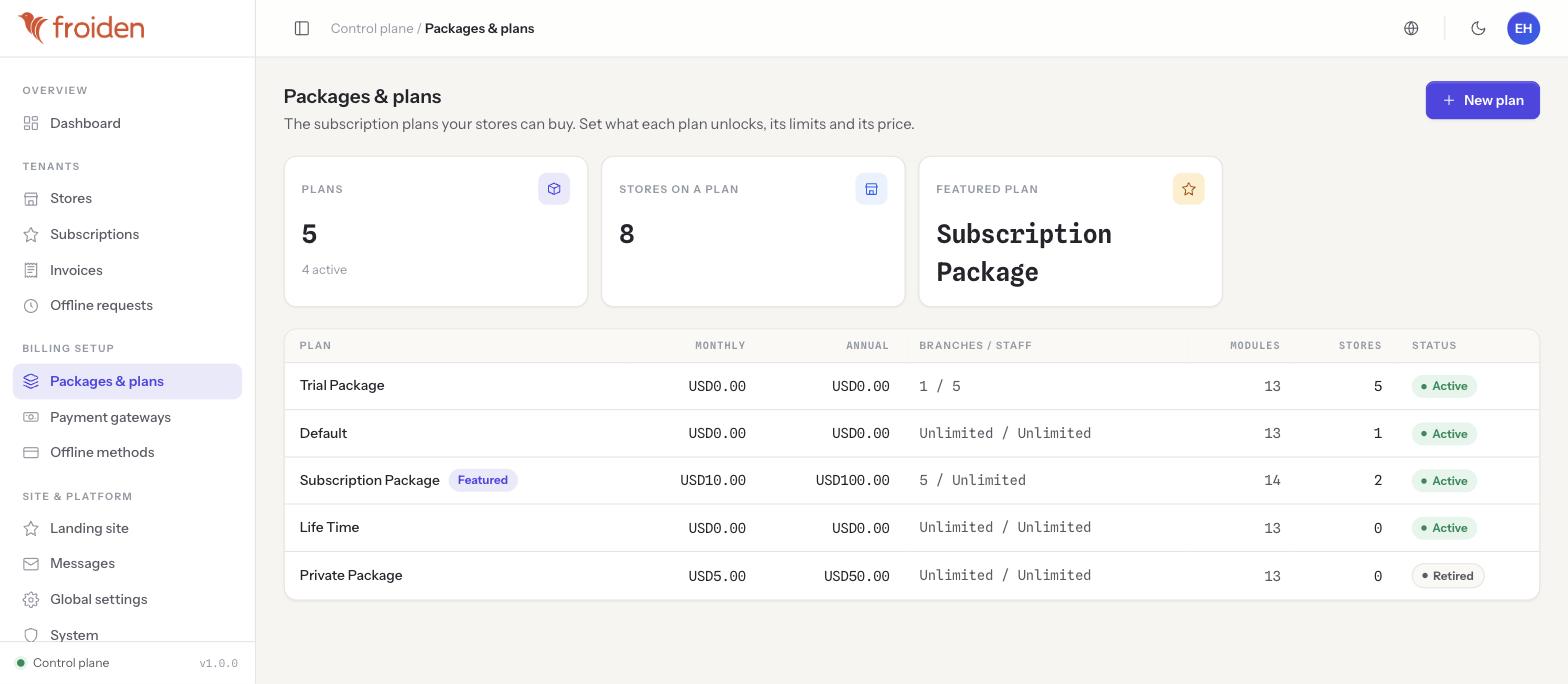
Each plan defines:
- Price — a monthly and an annual price (a store can usually save by paying annually).
- Limits — how many branches and staff accounts the plan allows (e.g. "5 / Unlimited").
- Modules — which parts of the product the store's back-office actually exposes. Report, Vendor (purchasing/suppliers) and Expense are real examples: a store on a plan without the Vendor module simply has no Purchasing section in its sidebar at all — this isn't a locked/greyed-out menu item, the section doesn't render.
One plan can be marked Featured, which highlights it to prospective stores on the public signup/pricing page (see the Landing site builder in Landing site & platform settings). A plan can also be Retired — it stays visible here so existing subscribers' billing history still makes sense, but it's no longer offered to new signups.
Creating or editing a plan
- Open Packages & plans
Click "New plan," or open an existing plan's row to edit it.
- Set price and limits
Monthly price, annual price, branch limit and staff limit.
- Choose modules
Tick which optional modules (Report, Vendor, Expense, and any others on your installation) this plan unlocks.
- Feature it, if it's your headline plan
Mark it Featured so it's highlighted on the public pricing page.
- Save
Every store currently on this plan picks up the change immediately — existing subscribers are not grandfathered automatically.
Payment gateways — the platform's own
The payment gateways configured here are the platform's — used to charge stores their subscription fee. This is deliberately a separate, two-layer arrangement from a store's own gateways:
| Collects from | Into | Configured at | |
|---|---|---|---|
| Platform gateways (this page) | Stores | The platform's own account | Superadmin → Billing setup → Payment gateways |
| A store's own gateways | That store's customers | That store's own account | Settings → Money & tax, inside that store's back-office (see Store profile & plan) |
These are two separate tables of credentials with nothing shared between them — configuring Stripe here, for the platform, has no effect on and no connection to a store enabling their own Stripe for their own checkout.
Offline methods
Not every store wants to pay by card — Offline methods lets you define non-gateway ways to pay, such as bank transfer details, that you show stores as an alternative at checkout. A store that pays this way can't be auto-charged, so a plan change it requests lands in the Offline requests queue (see Stores, subscriptions & invoices) for an operator to approve once payment is confirmed.
Tips & best practices
- Keep a Trial plan with sensible limits so prospective stores can evaluate MiniMart risk-free before they talk to a gateway at all.
- Retire a plan instead of deleting it once it has real subscribers — deleting would strand their billing history, while retiring simply stops new signups from choosing it.
- Review module assignment whenever you add a new optional module to the product — an existing plan won't pick it up automatically.
- Test a new gateway with a real, small transaction before pointing stores at it — gateway sandbox and live credentials are easy to mix up.
Notes & warnings
This page's gateways charge stores on behalf of the platform. A store's own Settings → Money & tax gateways charge that store's customers. They are separate credentials, separate accounts, and changing one never affects the other.
Modules decide whether a section of the back-office exists for a store at all (e.g. Purchasing). Within a section a store already has, permissions decide which of its own staff can use which part of it — see Glossary for the distinction.