
Returns & refunds
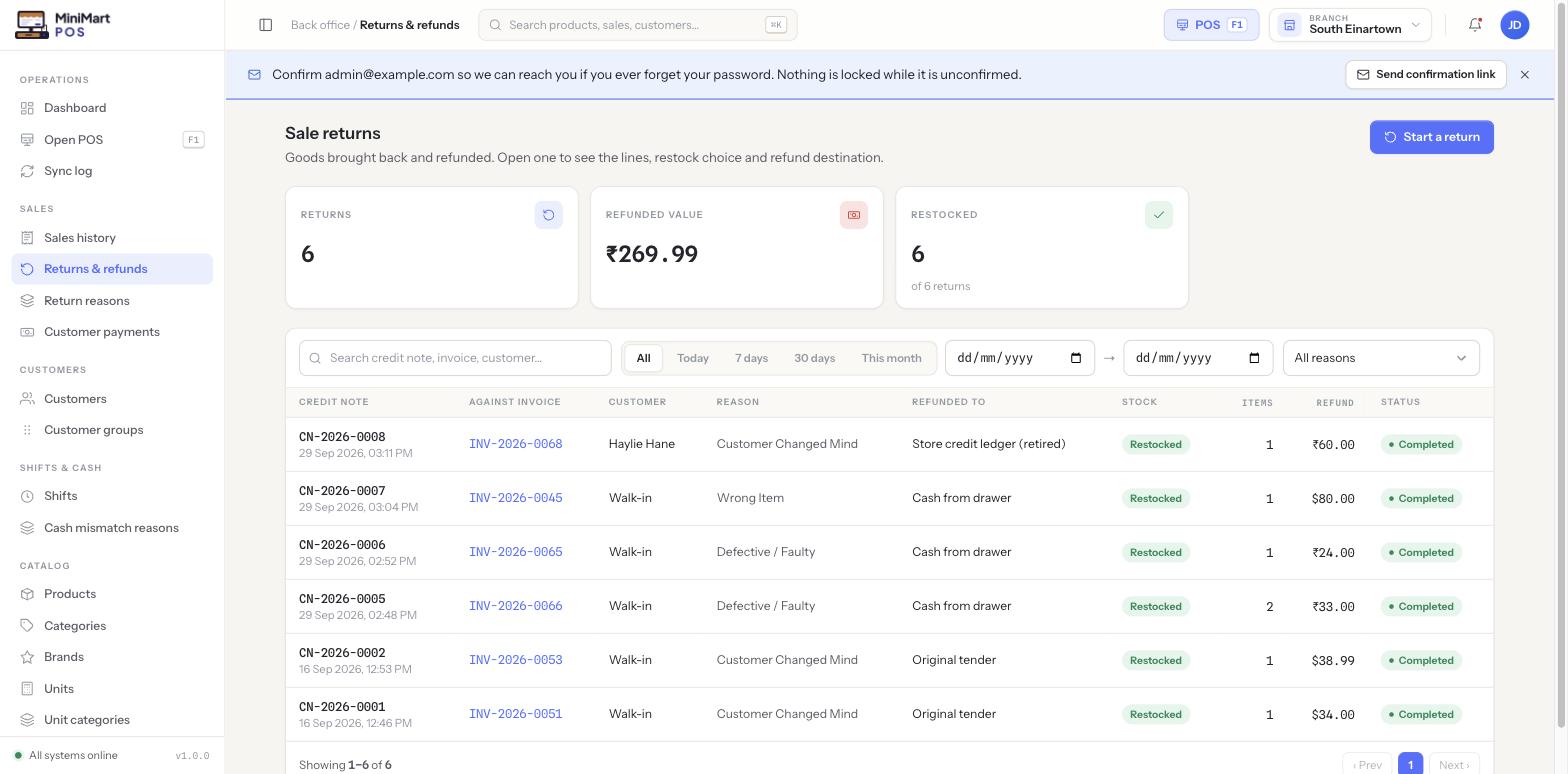
Goods brought back and refunded. Every return is tied to the original sale, records a reason, decides whether stock comes back onto the shelf, and sends the refund somewhere specific.
Overview
A return in MiniMart is always raised against a specific invoice — there's no way to refund something that was never sold. You can start one from this screen's "Start a return" button (you'll be asked to find the original invoice), or more directly from an open sale in Sales history. Either way you end up at the same form: which lines and quantities are coming back, why, whether the stock is going back onto the shelf, and where the money goes. Completing it generates a credit note number for your records.
Why it's useful
Returns touch three things at once — the customer's money, your stock count, and your books — and it's easy for any one of them to quietly drift if a return is handled as a one-off cash adjustment instead of a real transaction. Tying every return to its invoice, a managed reason, and an explicit restock decision keeps all three in sync and gives you a clean audit trail from "what came back" to "what we did about it."
Step by step
Starting a return
- Find the original sale
Either open "Start a return" on this screen and search for the invoice, or open the sale directly from Sales history and choose to return it from there.
- Select the lines and quantities
Choose exactly which items — and how many of each — are being returned. A return doesn't have to cover the whole sale.
- Pick a reason
Reasons like "Customer Changed Mind," "Wrong Item" or "Defective / Faulty" are a managed list your store admin maintains, not free text — this keeps your returns reporting meaningful instead of a pile of one-off notes.
Deciding whether stock comes back
Restocking isn't automatic for every reason. A customer who simply changed their mind about an unopened item usually gets it put straight back into sellable stock. A defective or faulty item often shouldn't be — it may need to be written off instead rather than quietly re-offered to the next customer. The return form asks explicitly, line by line, so this decision is always a deliberate one rather than a default nobody looked at.
Choosing where the refund goes
- Cash from the drawer
Pays the customer back directly out of the counter's cash — this shows up in that shift's cash reconciliation, see Shifts & cash drawer.
- Back to the original card/gateway
Reverses the charge through the same method it was collected on.
- Store credit on the customer's account
Adds the value to the customer's balance instead of handing back cash — useful for an exchange-minded return. See Customers & credit.
Finishing the return
Completing the form generates the credit note and marks the return Completed. The credit note, its reason, its restock choice and its refund destination are all visible later from this list or from the original invoice in Sales history.
Printing a return slip
Opening a completed return and clicking Print prints a separate, roll-shaped return slip on the same till printer a sale receipt uses — not a reprint of the original receipt. The original sale receipt is never altered or reprinted by a return: it stays exactly as it was handed over at checkout, and the return slip is the proof of this transaction, listing the items returned, the refund total, and how it was refunded. It follows the same Settings → Receipt options as a sale receipt (logo, branch, cashier, barcode, and so on) and the same print agent the counter already uses, so there's nothing extra to set up.
Finding a past return
Use the search box, the quick date ranges (Today / 7 days / 30 days / This month) or explicit date pickers, and the reason filter to narrow the list. The three stat cards at the top (returns count, refunded value, and restocked count "of N returns") give you an at-a-glance read on how much of what's coming back is actually going back onto the shelf.
Tips & best practices
- Keep your return reasons short and specific — "Defective / Faulty" and "Wrong Item" tell you very different things about where a problem is coming from (a supplier issue vs. a picking/packing issue).
- Review the restocked-count stat card periodically — a store where almost nothing gets restocked may have a stock-damage problem worth investigating upstream.
- Train cashiers to always start a return from the actual invoice rather than trying to describe the sale from memory — it's faster and it's the only way the credit note links back correctly.
Notes & warnings
There's no "no-receipt return" path that bypasses the original sale — if a customer can't be matched to an invoice, resolve that first (search by their name/phone if they're an attached customer) rather than trying to record an invoice-less refund.
Don't assume every return quietly puts stock back on the shelf — check the restock choice on each line, especially for "Defective / Faulty" returns, before relying on the stock count afterwards.